
Performance Max is a Google Ads campaign type that uses Google’s artificial intelligence to automatically show your ads across all of Google’s advertising channels — including Search, Display, YouTube, Gmail, Discover, and Maps — from a single campaign. You provide the creative assets (images, videos, headlines, descriptions), set your conversion goals and budget, and Google’s AI handles where, when, and to whom your ads appear. It is designed to maximise conversions or conversion value across every Google property simultaneously.
Performance Max puts Google’s AI in control of your campaign distribution. You give it the goal, the budget, and the creative materials. It decides the rest. This makes it powerful for businesses with clear conversion goals and sufficient budget, but less suitable for advertisers who want precise control over where their ads show or which keywords trigger them.
Google launched Performance Max (often called PMax) globally in November 2021 as a new goal-based campaign type. In 2022, Google migrated all existing Smart Shopping campaigns and Local campaigns into Performance Max automatically, making it the primary automation-first campaign type across the platform.
Understanding Performance Max matters whether you are a business owner managing your own Google Ads account or a digital marketing professional learning paid advertising. This guide explains what it is, how it works, when to use it, and where its limitations lie.
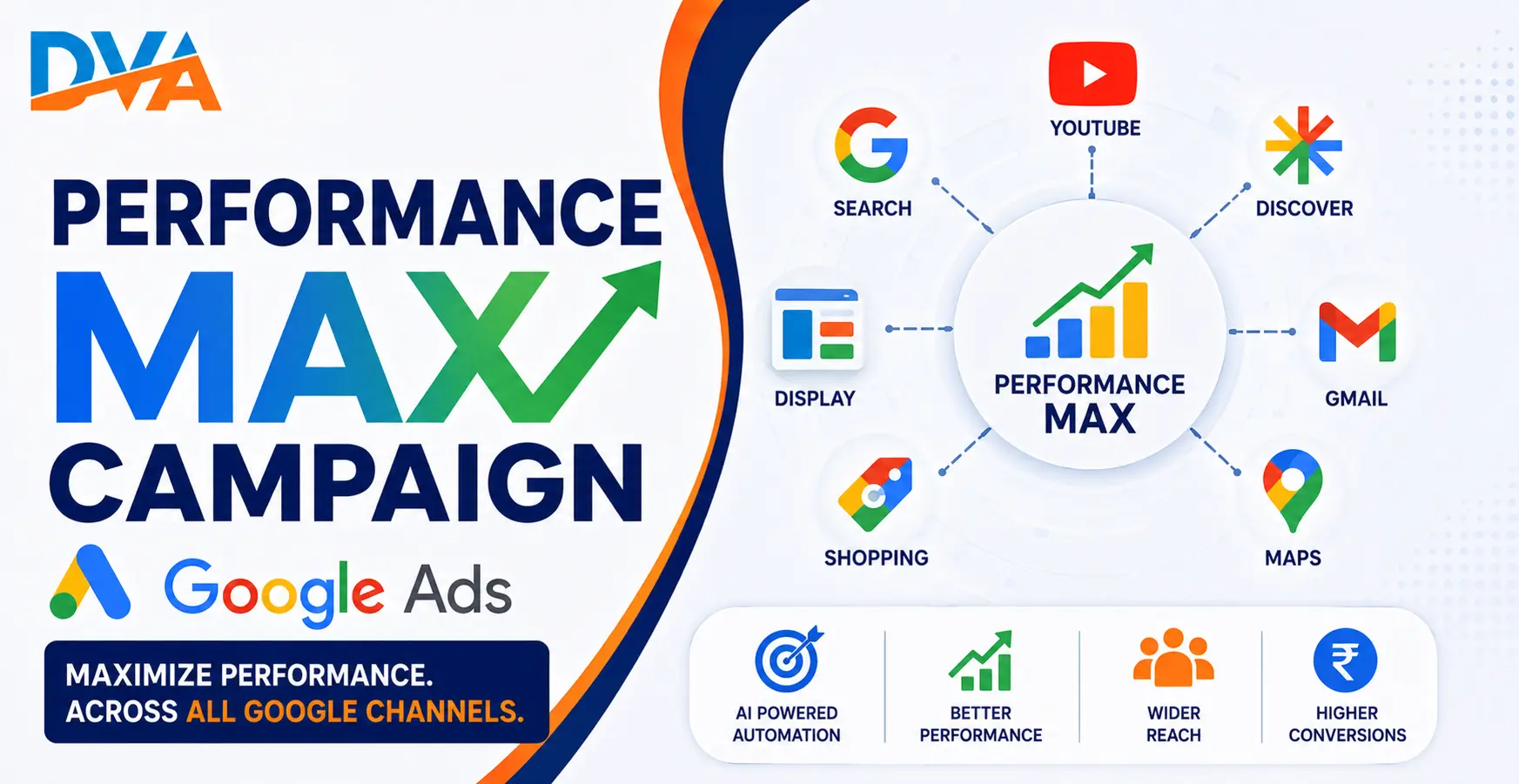
What Channels Does Performance Max Use?
Here is what each channel means in practice:
- Google Search — Text ads that appear when users search for relevant terms on Google.com
- Google Display Network — Banner and responsive image ads shown on websites, apps, and Google-partner platforms across the internet
- YouTube — Video ads shown before, during, or alongside YouTube videos
- Gmail — Ads that appear in the Promotions or Social tabs of Gmail inboxes
- Google Discover — Ads shown in Google’s Discover feed on mobile devices and the Google app
- Google Maps — Ads shown to users searching for local businesses or navigating in Google Maps
Google’s AI decides which channel is most likely to drive a conversion for each individual user at each moment. It shifts budget between channels automatically based on performance signals. You do not manually allocate budget per channel.
How Does Performance Max Actually Work?
The process from setup to delivery looks like this:
- Set your campaign goal. You choose what you want the campaign to achieve: online sales, lead generation, website traffic, local store visits, or app promotion. Performance Max optimises everything around this goal.
- Choose your bidding strategy. The two available strategies are Maximise Conversions (spend the budget to get as many conversions as possible) or Maximise Conversion Value (spend the budget to get the highest total conversion value). You can add a Target CPA or Target ROAS constraint to either.
- Set your budget. You set a daily budget. Google manages how it is spent across channels. A higher budget gives the AI more data to learn from, faster.
- Create asset groups. You upload all your creative materials in a structured format. Google assembles these into ads for different channels automatically.
- Add audience signals. You can provide hints about who your ideal customers are. Google uses these as starting suggestions, not strict targeting rules.
- Campaign goes live and learns. Performance Max has a learning period, typically the first few weeks after launch. During this time, the AI tests combinations and refines its approach. Performance data may look inconsistent initially.
For a full explanation of how Google Ads campaign structures work in general, our Google Ads beginner’s guide covers the core concepts before you move on to advanced campaign types like Performance Max.
What Are Asset Groups in Performance Max?
What you can include in an asset group, according to Google Ads documentation:
- Up to 15 images (landscape, square, and portrait formats)
- Up to 5 logos
- Up to 5 videos (or Google may auto-generate video from your images if none are provided)
- Up to 5 headlines (short, up to 30 characters each)
- Up to 5 long headlines (up to 90 characters each)
- Up to 4 descriptions (up to 90 characters each)
- Business name and display URL
Google scores your asset group with an “Ad Strength” indicator ranging from Incomplete to Excellent. A higher Ad Strength does not guarantee better results, but it does confirm that you have provided sufficient variety for Google’s AI to build effective ads across all channels.
Rated by Students
4.9/5 Rating. 500+ Students Trust Digital Vishnu Academy for Their Career
Practical training. Real projects. Placement assistance that actually works.
A practical tip: organise asset groups by theme. If you run a digital marketing training institute, you might create one asset group for your Google Ads course, one for your SEO course, and one for general digital marketing enquiries. Each gets different images, headlines, and descriptions relevant to that specific offering.
What Are Audience Signals in Performance Max?
Types of audience signals you can add include:
- Your own customer lists — Upload email lists of past customers or website visitors. Google uses these as the strongest signal.
- Website visitors — Audiences built from people who have visited your website, from Google Analytics 4 or Google Ads remarketing tags.
- Custom intent audiences — People who have searched for specific terms related to your business.
- In-market audiences — Google’s predefined audience segments of people actively researching products or services in your category.
- Interest and demographic targeting hints — Age, gender, parental status, or interest categories.
The better your audience signals, the faster Performance Max’s learning period completes and the more relevant your early results tend to be.
Performance Max vs Other Google Ads Campaign Types
| Feature | Performance Max | Search Campaign | Display Campaign | Shopping Campaign |
|---|---|---|---|---|
| Channels | All 6 (Search, Display, YouTube, Gmail, Discover, Maps) | Google Search only | Display Network only | Search + Shopping tab |
| Keyword control | None (use search themes to guide AI) | Full keyword targeting | Audience-based, no keywords | Product feed, limited keywords |
| Creative input | Images, videos, headlines, descriptions (assets) | Text headlines and descriptions only | Images and text (responsive) | Product images from feed |
| Automation level | Fully automated | Partially automated | Partially automated | Partially automated |
| Conversion tracking needed | Yes — essential | Recommended | Recommended | Yes — for Smart Shopping |
| Best for | Multi-goal campaigns, e-commerce, leads at scale | Direct intent targeting, precise keyword control | Brand awareness, remarketing | E-commerce product sales |
For a deeper look at how Google Ads compares to paid advertising on other platforms, our Google Ads vs Facebook Ads ROI comparison covers the broader paid advertising decision. And if you are managing campaign spend, our guide on reducing your Google Ads cost per click applies to traditional campaign types which you may run alongside Performance Max.
When Should You Use Performance Max?
Good fits for Performance Max:
- E-commerce businesses that want to drive product sales across multiple Google surfaces at once (Shopping, Search, Display, YouTube)
- Lead generation campaigns for services where you have conversion tracking properly set up and a history of converting customers
- Businesses that want to reach users across the full Google ecosystem without managing multiple campaign types separately
- Advertisers with a strong creative library — varied images, a video or two, and multiple ad copy variations
- Campaigns targeting multiple conversion goals simultaneously, such as online enquiries plus phone calls plus store visits
Situations where Performance Max may not be the right first choice:
- New accounts with no conversion history — the AI has no data to learn from and may spend budget inefficiently during the extended learning period
- Very small budgets where the AI cannot gather enough signals to optimise meaningfully
- Campaigns requiring strict keyword control, such as legal, financial, or regulated industry advertising
- Brand awareness objectives where you want to control specific placements or audience segments precisely
- Businesses without conversion tracking set up — Performance Max cannot optimise without clear conversion signals
Performance Max Limitations — What You Give Up
Key limitations to be aware of before choosing Performance Max:
- Limited search term visibility. Unlike Search campaigns where you can see every search query that triggered your ad, Performance Max shows aggregated search term insights rather than a full query list.
- No placement exclusions at ad level. You can add placement exclusions at the account level or request certain exclusions, but you cannot granularly control where on the Display Network or YouTube your ads appear.
- Learning period variability. If your campaign does not get enough conversions within the first few weeks, the AI may take much longer to optimise, or performance may remain inconsistent. Google recommends having at least 30–50 conversions per month at the account level for smart bidding to work well.
- Brand search cannibalisation risk. Performance Max may compete with your existing Search campaigns for brand keyword traffic. Using brand exclusions and careful campaign segmentation helps manage this.
- Auto-generated video. If you do not provide video assets, Google may auto-create video ads from your images. These auto-generated videos are often basic. Providing real video assets gives much better control over how your brand appears on YouTube.
Familiarise yourself with the full range of Google Ads terminology — including terms like Smart Bidding, Target ROAS, Target CPA, and audience signals — before setting up your first Performance Max campaign.
Performance Max is one of the most powerful — and most misunderstood — campaign types in Google Ads. Used correctly, with solid conversion tracking, good creative assets, and a realistic budget, it can deliver strong results across multiple channels from a single campaign. But it is not a shortcut. It still requires a clear goal, proper setup, and patience during the learning period.
If you are building your Google Ads skills from the ground up and want to understand campaign types including Performance Max with hands-on practice and mentorship, our digital marketing course in Coimbatore covers Google Ads from first campaign to advanced automation as part of a practical curriculum.
Frequently Asked Questions
Is Performance Max better than a Search campaign?
Performance Max and Search campaigns serve different purposes. Search campaigns give you precise keyword control and are ideal for targeting users with specific, high-intent search queries. Performance Max is better when you want to reach users across multiple Google channels simultaneously with a single automated campaign. For most advertisers, running both in parallel — Search for brand and high-intent terms, Performance Max for broader reach — tends to deliver better combined results than either alone.
Do I need a large budget to run Performance Max?
Performance Max does not have a mandatory minimum budget, but it works significantly better with a budget large enough for Google’s AI to gather meaningful conversion data quickly. If your daily budget only delivers a handful of clicks per day, the AI will take much longer to learn and optimise. As a general guideline, aim for a daily budget that can support at least 10–20 clicks per day to give the campaign a realistic chance of entering the optimisation phase within the first month.
Can I use keywords with Performance Max?
Performance Max does not use traditional keywords. Instead, you can add “search themes” — phrases that hint to Google what types of searches your campaign should target on Google Search. These are suggestions, not strict keyword targets. For precise keyword targeting on Google Search, run a separate Search campaign alongside Performance Max and use campaign-level negative keywords to prevent the two campaigns from cannibalising each other.
What is the learning period for Performance Max?
Performance Max typically has a learning period of 4–8 weeks after launch, during which Google’s AI is testing asset combinations, exploring audiences, and optimising budget allocation across channels. During this period, cost per conversion may be higher and performance inconsistent. Avoid making major changes to the campaign during the learning period, as each significant change can reset or extend it.
Does Performance Max replace Smart Shopping campaigns?
Yes. Google migrated all Smart Shopping campaigns and Local campaigns to Performance Max in 2022. Smart Shopping no longer exists as a separate campaign type in Google Ads. If you previously ran Smart Shopping campaigns, those are now running as Performance Max campaigns. The core function — automated product ad delivery across Google’s network — is preserved, but Performance Max also adds YouTube, Gmail, and Discover as additional channels.
How do I know if Performance Max is working?
Check performance in the Insights and Asset Group sections of your campaign dashboard. Key metrics to monitor are conversion volume, cost per conversion, and conversion value (if tracking revenue). The Insights tab shows which audience segments and asset combinations are performing. Compare results against your target CPA or ROAS after the full learning period. If the campaign is not meeting goals after 8 weeks with sufficient budget, review your asset quality, audience signals, and conversion tracking setup before making major changes.
Sources and Further Reading
- Google Ads Help Centre — Official documentation on Performance Max campaign setup, asset groups, audience signals, and bidding strategies
- Google Ads — The platform where all Performance Max campaigns are created and managed
